
Re:Link sends the active layer straight into another program running on the same computer. There is no file to save, find and import: press Send in Re:Form and the model is in the other program's open scene. Keep sculpting, press Send again, and the model there is replaced where it stands.
It works with Blender, Godot, Unity and Unreal Engine. Each needs a small receiver, a free add-on that ships with Re:Form, installed once.
How it works
The receiver listens on your own computer only. When you press Send, Re:Form builds the same file that File ▸ Export would write and hands it to the receiver directly, from your browser to the other program. Nothing is uploaded and nothing goes through a server.
The first time, your browser asks whether Re:Form may connect to apps on this device. Allow it: that permission is what lets the page reach the receiver. If you blocked it by mistake, switch it back on in the site settings beside the address bar.
Send a layer
- Open the other program with its receiver switched on (see below), with the scene you are working on open.
- In Re:Form, make the layer you want to send the active one and choose File ▸ Re:Link….
- The window looks for a receiver and names the project it found. Press Send.
The window says what was sent, where, and what the receiver did with it: Added to the scene the first time, Replaced the one sent before after that.
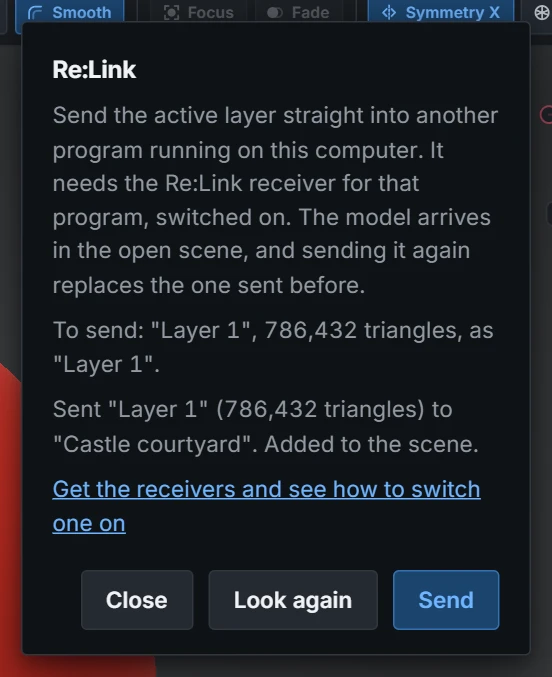
- The model travels under the layer's name. A layer sent again under the same name replaces the earlier one; rename the layer, or send a different layer, and it arrives as a second model beside it.
- It is the mesh as it is now, at the subdivision level you are on, exactly as Export writes it: the same size (your Unit mm setting applies), the same smooth or flat shading, and your vertex colours when the receiver takes GLB.
- Where you put the model in the other program is kept. Move it, turn it, scale it, put it in a collection or under a parent: the next send lands in the same place.
- Look again asks for the receiver once more, for when you have just opened the other program.
Sending never changes your sculpt. It only reads it.
Which file is sent, and on which plan
Each receiver lists the formats its program reads, best first, and Re:Form sends the first one your plan exports. So Re:Link follows the same plan rule as exporting, and it works on every plan:
| Program | On Pro | On Free |
|---|---|---|
| Blender | GLB, with vertex colours | OBJ |
| Godot | GLB, with vertex colours | OBJ |
| Unity | FBX | OBJ |
| Unreal Engine | FBX | OBJ |
Install a receiver
Each receiver answers only pages of Re:Form, and only from your own computer. Run one receiver at a time: they share one port (47800), so the second program to start will say the port is in use.
Blender (3.6 and later)
- Download reform_relink_blender.py.
- In Blender: Edit ▸ Preferences ▸ Add-ons ▸ Install…, pick the file, and tick Re:Form Re:Link receiver.
The add-on's entry in Preferences shows that it is listening. The model arrives as one mesh object named after the layer.
Godot (4.2 and later)
- Download reform-relink-godot.zip and unzip it into your project folder, so the project has
addons/reform_relink. - In Godot: Project ▸ Project Settings ▸ Plugins, and tick Re:Form Re:Link receiver.
The file is saved in res://reform_relink/ and placed in the scene you have open as a node named after the layer. With no scene open the file is still saved in the project; open a scene and send again to place it.
Unity (2020.3 and later)
- Download ReformRelinkReceiver.cs.
- Put it in your project at
Assets/Editor/ReformRelinkReceiver.cs. There is nothing to switch on.
Window ▸ Re:Form Re:Link shows that it is listening. The file is saved in Assets/ReformRelink/ and placed in the open scene as an object named after the layer.
Unreal Engine (4.26 and later, and 5)
- In the editor: Edit ▸ Plugins, switch on Python Editor Script Plugin and Editor Scripting Utilities, and restart.
- Download reform_relink_unreal.py and put it in your project at
Content/Python/reform_relink_unreal.py. - Edit ▸ Project Settings ▸ Plugins ▸ Python ▸ Startup Scripts: add
reform_relink_unreal.py, and restart.
The Output Log says that the receiver is listening. The model is imported as a static mesh in /Game/ReformRelink and placed in the open level as an actor named after the layer.
If it does not connect
- "No receiver was found." The other program is not open, its receiver is not switched on, or the browser was not allowed to connect to apps on this device. Check all three, then press Look again.
- "Something answered, but it is not a Re:Link receiver." Another program on your computer is using port 47800. Close it, then restart the receiver.
- "The receiver speaks a different version of Re:Link." Download the receiver again from this page: it is the one that matches Re:Form as it is now.
- "The model was not taken." The receiver's own reason follows, in its words: for example that the file could not be imported.
- A very large model takes a while to import on the other side. The window waits, and says so when the other program was too busy to take it in time.